
Sonivo:Music Player
I CareMusic & Audio
4.636.00 Reviews
- Version
- 1.0.8
- Installs
- 10.00K
- Age Rating
- Everyone
Screenshots
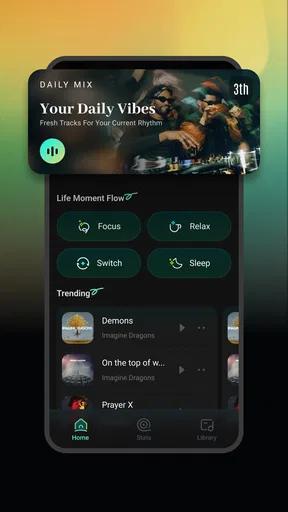
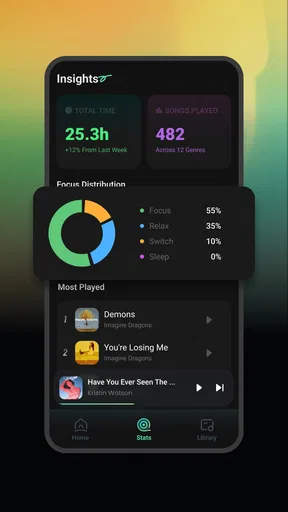
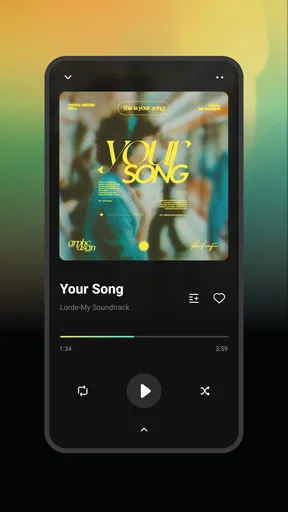
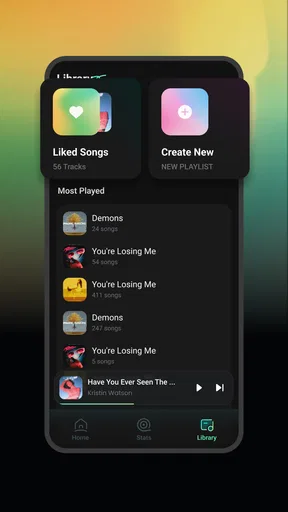
Our Review of Sonivo:Music Player
 Analysis by Appyee
I tried Sonivo: Music Player with a simple goal: turn music already available on a phone into something I could play without depending on a connection. That starting point matters because this is not presented as a streaming service with a giant online catalog. It is a free music and audio app from I Care, aimed at straightforward listening, and its appeal is clearest when you already have music ready to use.
The first impression is uncomplicated. Sonivo is listed for everyone, works on devices running Android 8.0 or later, and the current release is version 1.0.8. It has also attracted a 4.6 average from around 124 ratings and passed 10K+ installs, which suggests that its basic idea is easy for people to understand. I would describe it as a practical local music player rather than an all-purpose replacement for every music app on a phone.
From music on the phone to a dependable listening routine
I look at this section as the bridge between having music on a phone and making it part of a routine I can rely on. The useful question is not only whether a track plays, but whether I have prepared the right selection before leaving home. From there, I consider how that routine holds up when listening becomes longer or less predictable.
Starting with the right expectation
Before using Sonivo, I would separate two very different needs. If I want to search for new artists, follow editorial playlists, or move between a huge online library, I normally look at a streaming platform. If I want to play music that is already stored on my device, an offline player makes more sense. Sonivo belongs firmly in the second situation.
That distinction is the most important practical insight. A “free music app” can mean many things, but Sonivo’s strongest use case is listening without Wi-Fi. The experience depends less on discovering content inside the app and more on whether the music I want is already accessible on the phone. For a personal collection, downloaded albums, or tracks transferred from another source, that can be a cleaner arrangement than opening a larger service every time.
I also appreciate that the app is free. There is no purchase decision to make before testing the workflow, so I can install it, check whether it handles my collection comfortably, and decide whether it fits my habits. That makes it especially approachable for someone who wants a basic offline music option instead of another subscription.
Step one: preparing the listening source
The useful workflow starts before pressing play. I first make sure the songs I expect to use are actually available on the device. This is where a little preparation saves frustration later. I would organize music into clearly named folders or keep album and artist information consistent, because a player can only present the material it can access. Sonivo is not a substitute for obtaining music or arranging a disorganized collection.
For a commute, I would prepare a small group of albums or playlists before leaving home. For travel, I would check the entire selection while still connected, rather than discovering halfway through a journey that a favorite track is not stored locally. This is a non-obvious advantage of treating Sonivo as the final step in a music workflow: it encourages me to verify the actual source instead of assuming that every song will be available when the network disappears.
That preparation also helps with storage decisions. Keeping only the music I regularly use can make the library easier to navigate, while a very large collection may require more patience when searching. I would not install the app expecting it to solve file management by itself. Its job is to make listening from the phone more direct.
Step two: moving from collection to playback
Once the music is ready, the handoff is simple in concept: open the player, locate the desired material, and start listening. The benefit is that the playback stage does not need to be tied to Wi-Fi. That makes Sonivo useful in places where connectivity is weak, expensive, distracting, or deliberately switched off.
I can imagine using it during a flight after preparing music beforehand, on a train route with unreliable reception, or while saving mobile data during a long day outside. It also suits people who prefer not to keep a streaming account active just to play familiar albums. In these situations, the app’s value is not a flashy feature; it is the removal of one dependency from the listening chain.
A realistic everyday example would be a morning commute. I would choose a few albums at home, leave with the phone in offline conditions, open Sonivo when the journey begins, and continue listening through areas where a streaming app might pause or reduce quality. When I arrive, the music remains a local activity rather than something that has consumed attention through repeated connection problems.
The handoff between phone, app, and listener
Every music player sits between the files on a device and the person using it. Sonivo’s success depends on that handoff feeling predictable. The phone supplies the content, the app provides the listening interface, and I supply the decisions about what to play. When those three parts line up, the experience is pleasantly low effort.
This is also where expectations need to stay realistic. A local player cannot automatically provide the same discovery layer as a streaming service. There is no reason to choose Sonivo for a constantly changing recommendation feed if my main goal is to find unfamiliar releases. I would use it after the discovery stage, once I have music I want to keep available offline.
For families or shared devices, the everyone age rating makes the app easy to consider as a general-purpose player. Still, the content comes from the collection being played, not from the age label itself. Parents should think about which music is stored on the device rather than assuming the rating controls the songs.
What the listening result feels like
The outcome I get from Sonivo is focused: music playback without the usual online requirement. That can feel more stable than opening a feature-heavy service for a task as simple as playing an album I already know. It is also easier to understand why the app is useful. I am not installing it for a broad ecosystem; I am installing it to create a direct path from local music to listening.
I find that particularly helpful when battery, data, or attention matters. A deliberately offline routine can reduce the temptation to browse endlessly, and it keeps a familiar collection available in places where a connection is not dependable. For someone who wants background music while working, walking, or traveling, that focused behavior may be more valuable than a large menu of online features.
There is a trade-off, though. The quality of the result depends heavily on the organization and completeness of the music on the phone. If the collection is scattered, poorly labeled, or missing important tracks, Sonivo cannot magically make it feel like a polished streaming catalog. The app can simplify playback, but it cannot remove every upstream problem.
Where the workflow breaks
The first break occurs when a user expects streaming discovery. Someone who wants instant access to new music, artist pages, synchronized recommendations, or a broad online catalog will probably feel restricted. In that case, a conventional streaming alternative is the better primary tool, while Sonivo could serve as a secondary offline player for selected music.
The second break is collection preparation. If I download or transfer music irregularly, I need to remember what is actually on the phone. That extra responsibility is minor for a modest personal library but more noticeable for someone who changes devices often or expects every playlist to follow automatically. A streaming service usually handles that handoff more centrally, although it may introduce subscriptions or connection requirements.
A third point is device compatibility. Sonivo supports Android 8.0 and newer, which covers many Android phones, but anyone using an older system should check compatibility before planning a full switch. The app is specifically an Android choice in this context, so iPhone users should not assume the same installation path or experience is available to them.
There is also a mental adjustment for people accustomed to online controls. With a local player, I need to think in terms of stored music rather than an account-based library. That can be liberating, but it is less convenient if I frequently move between several devices. The right choice depends on whether independence from Wi-Fi matters more than automatic access everywhere.
Small habits that make Sonivo more useful
My first tip is to build an offline test before relying on the app. I would turn off Wi-Fi and mobile data, then play a few tracks from different albums. This checks the complete path from stored file to playback and catches missing downloads while there is still time to fix them. It is more useful than merely opening the app at home and assuming a travel playlist is ready.
My second tip is to prepare by situation rather than by an enormous collection. A short group for commuting, another for exercise, and a separate travel selection is easier to maintain than copying every song onto the phone. This reduces the search burden and makes the offline benefit immediate. It also gives the app a clear role instead of turning it into another crowded library.
My third tip is to use Sonivo as the reliable endpoint of a broader music routine. I might discover music elsewhere, decide which albums I genuinely want, place those tracks on the device, and then use Sonivo for uninterrupted playback. That division of labor avoids asking one app to be both a discovery service and a local player. In my experience, this is the most sensible way to get value from a focused tool.
A fourth useful habit is to check the phone’s available space before adding a large batch of music. The player itself may be free, but offline listening still depends on local storage. Keeping a manageable selection means fewer surprises and faster access to the music I actually intend to hear.
Who should use it, and who should choose something else?
I would recommend Sonivo to someone who already keeps music on an Android phone and wants a simple way to listen without Wi-Fi. It is a good match for commuters, travelers, people with inconsistent connectivity, and listeners who dislike depending on an active streaming account for familiar albums. The free price also makes it a low-risk option for testing a local-first routine.
I would be more cautious about recommending it as the only music app to a person whose enjoyment comes from discovery. If daily listening means searching for new releases, following curated lists, sharing online activity, or switching between devices without manual preparation, a full streaming service will probably fit better. Sonivo is strongest when the music choice has already been made.
It may also be less suitable for someone who does not want to manage files or downloads. The app reduces the effort of playback, but it does not eliminate the need to know where the music comes from. That is not a flaw in the narrow sense; it is simply the cost of choosing an offline model.
My final take after following the full workflow
Sonivo succeeds when I judge it by the complete journey rather than by the expectations attached to larger music platforms. I start with music on the phone, prepare a practical selection, hand it to the player, and end with listening that does not depend on Wi-Fi. That chain is clear, and for the right listener it is genuinely useful.
The app comes from I Care and has reached a 4.6 average, with more than a hundred ratings and over ten thousand installs. Those figures show a modest but positive reception, while the free, everyone-friendly positioning keeps the barrier to trying it low. More importantly, the workflow makes sense: local music goes in, focused offline playback comes out.
I would not choose Sonivo to replace a discovery-heavy streaming service. I would choose it when control, simplicity, and offline access matter more than an endless online catalog. If that describes your routine, Sonivo is worth trying as a dependable local music companion. Just prepare the music first, test it without a connection, and let the app do the part it is best suited for: getting the songs already on your phone into your ears with as little friction as possible.
Verdict
Strengths of Sonivo:Music Player
- Clean interface makes browsing albums, artists, and playlists straightforward.
- Supports offline playback, so your music remains available without mobile data.
- Useful playlist tools make it easy to organize personal music collections.
- Playback controls are responsive and convenient from the lock screen.
- Lightweight design generally uses less storage than feature-heavy music apps.
Limitations of Sonivo:Music Player
- Some advanced features may require a premium subscription or in-app purchase.
- The experience depends heavily on having properly tagged local music files.
- Music discovery options may feel limited compared with major streaming services.
- Compatibility with unusual audio formats can vary between devices.
- Occasional setup work may be needed to grant storage and media permissions.
Similar Picks in This Category
View All
YouTube Music
Google LLC4.4

Samsung Music
Samsung Electronics Co., Ltd.3.8

Spotify: Music and Podcasts
Spotify AB4.3

JioSaavn - Music & Podcasts
Saavn Media Limited4.3

Lark Player:Music Player & MP3
Lark Player Studio - Music, MP3 & Video Player4.6

StarMaker: Sing Karaoke Songs
SKYWORK AI PTE. LTD.4.3
Frequently Asked Questions
What is Sonivo: Music Player, and what can it do?
Sonivo: Music Player is designed for listening to music stored on your device, offering a convenient way to organize tracks, browse albums and artists, and create personalized playlists. Depending on the version and device, it may also include features such as background playback, queue management, shuffle and repeat modes, favorites, and customizable playback controls. It is primarily intended for local music rather than replacing a subscription-based streaming service.
Does Sonivo: Music Player require an internet connection?
For playing songs already saved on your phone, Sonivo generally does not need a constant internet connection. This makes it useful for offline listening, travel, or areas with limited coverage. Internet access may still be required for optional functions, advertisements, updates, artwork retrieval, or other online services included in a particular release. Availability can vary between Android and iOS, so checking the app’s current store description is recommended.
Which audio files and devices are supported by Sonivo?
Support depends on the operating system and the specific version installed. Sonivo is normally intended to work with common music formats available through the device’s media library, but not every codec, cloud location, or protected file is guaranteed to play. On Android, access may depend on media and storage permissions; on iPhone, imported or synchronized music may be handled differently. Test your preferred files before moving your entire library.
Is Sonivo: Music Player free to download, and are there advertisements or in-app purchases?
The download model, advertising, and premium options can change with updates, region, and platform. Some versions may be free with ads or limited features, while others can offer an optional purchase or subscription to remove advertising or unlock additional controls. Before installing, review the Google Play or App Store listing carefully for current pricing, trial terms, renewal conditions, and any permissions requested by the application.
Is Sonivo: Music Player safe to use and suitable for my music library?
The safest approach is to install Sonivo only from the official Google Play Store or Apple App Store and verify the listed developer, permissions, privacy information, and recent user feedback. A music player should not need unrelated access to sensitive data, although media-library permission is normally necessary. Before uninstalling or changing devices, keep a separate backup of your original music files and playlists, since app data may not transfer automatically.
